Changelog
LTCast 0.7.24
Edit a whole run of triggers at once, and stop hunting for the output type
2026-09-09
New
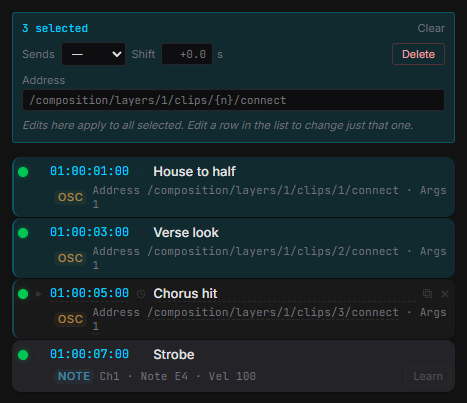
- Select a run of triggers and change them together — output type, OSC address, timing. One undo puts all of them back.
- Ctrl+A / C / V / D on the trigger list. Paste lands on the playhead and keeps the original spacing.
- Filter the list by protocol when a song holds both MIDI and OSC triggers.
- Changing a song’s start timecode asks whether its triggers should move with it.
Worth knowing
- The output type, preset and OSC address are no longer behind Advanced — and Quick Setup now has OSC presets, not just MIDI ones.
- Text fields need a double-click to edit; a single click selects the row.
- The trigger MIDI port moved to Settings → Outputs, and MIDI input with its mappings to Settings → Devices.
Fixed
- A trigger fires again after you move the playhead back behind it. Re-running a section no longer loses its looks for the rest of the launch.
- Triggers imported from cues use the song’s own start timecode, and inherit the output type you set instead of always being MIDI.
- Typing a timecode after Stop no longer jumps past the end of the song.