
Follow the clock.
Run the show.
LTCast chases your show's existing master clock and turns it into a script every department can follow on their own screen.
30-day free trial of all Pro features — no credit card required. macOS build is Apple-notarized.
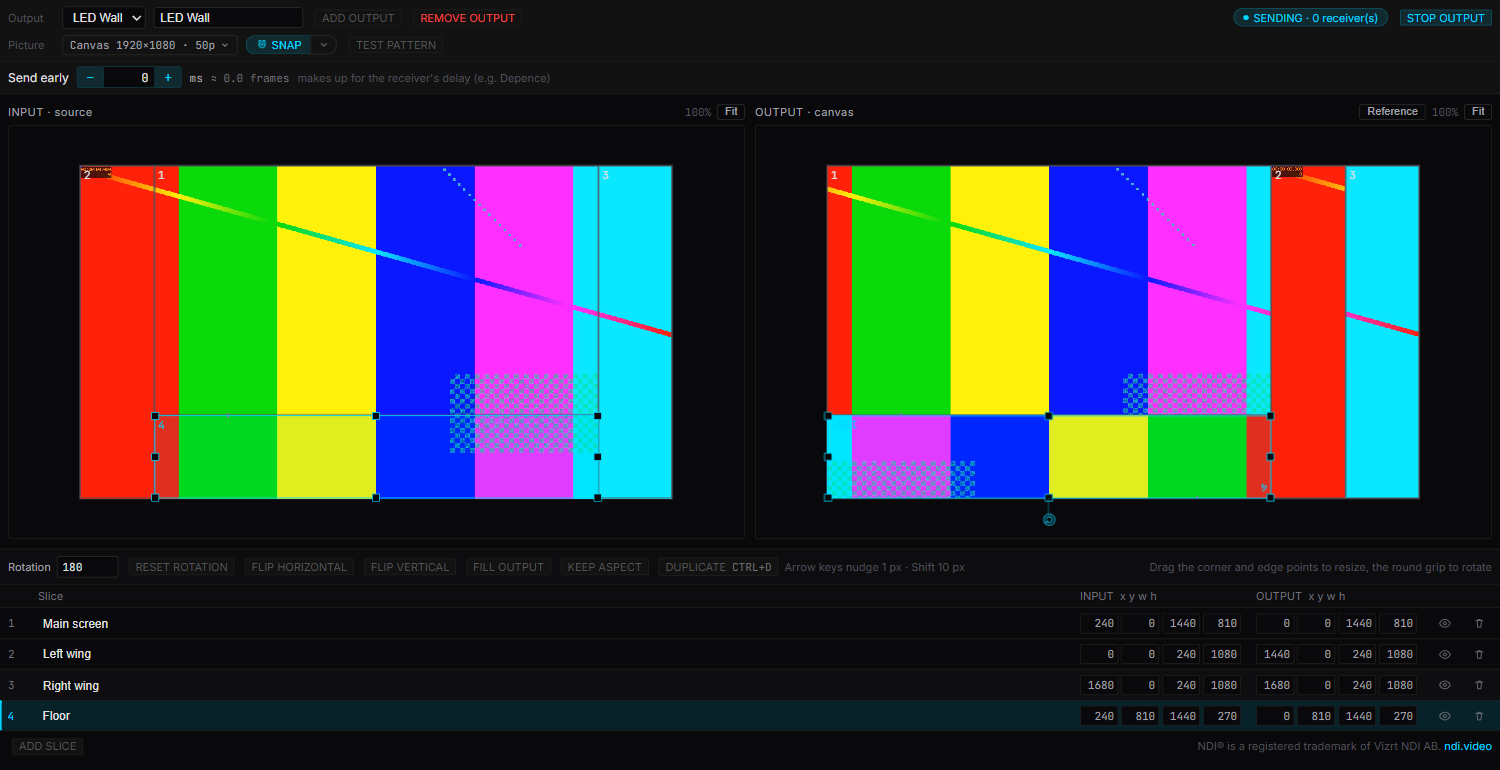
Send the show video to your LED wall over NDI®.
Cut the song's video into slices, rotate and place them on the canvas your LED processor or media server expects, and LTCast sends it over the network in step with the timecode.
- Main screen, wings and floor — a slice each, at any angle.
- A test pattern to check the mapping and line up the sync.
- Tested with Depence R4.
One script. Every department sees their part.
LTCast locks to the master clock the room is already running on and turns it into cues — then lighting, video, stage, and audio each open a link filtered to just their part of the show. No briefing, no shared spreadsheet nobody updates.
The master clock
Already running the room — LTC over audio, or Art-Net timecode. No change needed on stage.
LTCast
Reads that clock, runs the script you built on the timeline, and keeps every department in time.
Your crew
Lighting, video, stage, and audio each open their own filtered view — on a phone or laptop, PIN-protected.
Build your cues on a visual timeline.
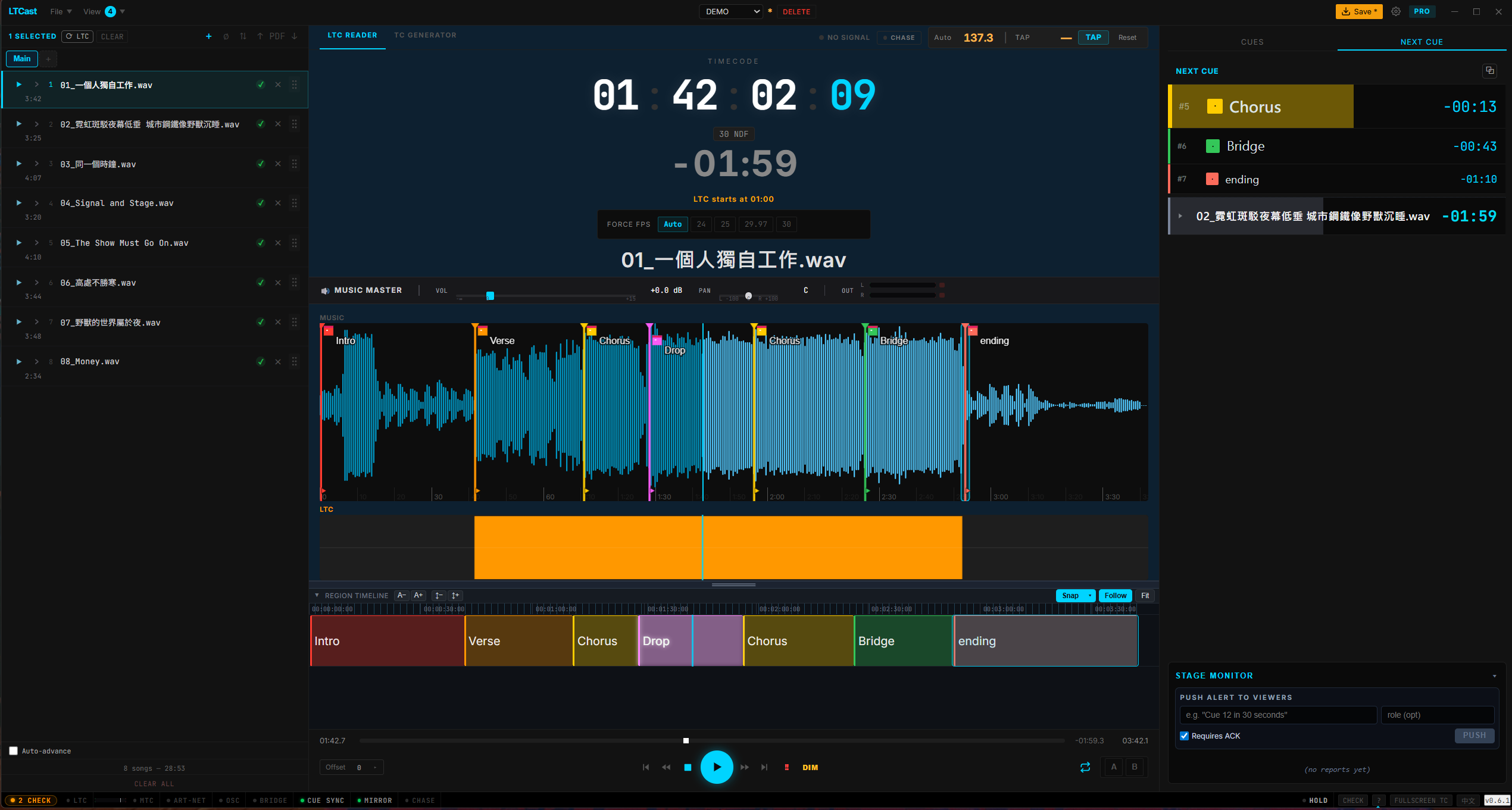
Most timecode tools give you a clock and nothing else. LTCast gives you a zoomable SMPTE timeline — lay out every section of the song, snap it to frames, and fire it live. The visual cue editor a hardware box can't give you.
- Snap regions to frames and follow the playhead as it plays.
- Auto-colored markers with multi-step undo and Ctrl+←/→ jump-to-marker.
- Quick-Cue fires role & structure cues from number keys 1–8 — improvise on the night.
- Pop the Next Cue stack into an always-on-top overlay over any app.
One script. Every department. Zero extra hardware.
LTCast chases the clock the room is already running on and turns it into a script — with LTC, MTC, MIDI Clock, Art-Net, and OSC ready the moment you need to drive a device directly. No dongles, no rack, no chain of brittle bridge apps.
Region timeline + Quick-Cue
Lay out Intro / Verse / Chorus regions on a zoomable, snapping SMPTE timeline — the visual cue editor a hardware box never gives you. Auto-colored markers with multi-step undo, follow-playhead, and Ctrl+←/→ jump-to-marker. Quick-Cue fires role and structure cues live from number keys 1–8 — fast enough to improvise on the night.
LTC read, generate & chase
Drop-frame 29.97, done right — correct frame math at every minute boundary, plus non-drop 24 / 25 / 30 fps, auto-detected from any audio file. Chase mode slaves to incoming external LTC and locks to the show's master clock; generate LTC for tracks that don't have it.
MTC output
No JS jitter, ever — quarter-frame and full-frame MTC scheduled with chained timestamps over Web MIDI, so timing never drifts on a busy render thread. Locks DAWs and QLab cleanly.
MIDI Clock
Send 0xF8 clock at any BPM. Drive drum machines, Ableton, Traktor, and hardware synths from your show's master tempo.
Art-Net output
UDP OpTimeCode packets for grandMA, ChamSys, Avolites and any Art-Net 4 console. Broadcast, unicast, or send to several consoles at once.
OSC output
Per-cue templates for Resolume, Disguise (d3), and WATCHOUT — fan out to several servers at once. Send a custom OSC message at any timecode, and test-fire any cue before doors.
New · Pro
NDI® video output
Cut the show video into slices, rotate and place them on a canvas, and send it to your LED processor or media server over NDI — in step with timecode. Tested with Depence R4.
Viewer Mirror
PIN-protected, and the Stage Monitor collects every viewer's status back to the operator — so you know who's actually on the right cue before doors.
Always-on-top cue overlay
Pop the Next Cue stack into a frameless window that floats over Resolume, your lighting console, or any full-screen app — live timecode and the full upcoming-cue list, always in view. Drag it anywhere, on any monitor. Free for everyone.
grandMA2 / MA3 export
Export your cues and song markers straight to grandMA2 and grandMA3 XML — colors translated to each console's palette. No more retyping the cue list on the desk.
Show tools, built in
Pre-Show Check, Panic button, Show Log (CSV), Setlist auto-advance, Show Timer, and the Viewer Mirror your crew opens on a phone.
Built for the people running the show.
Whether you're behind a touring console, a media server, or a band's playback rig — LTCast is the one clock everyone locks to.
Touring & festival ops
Run timecode off a Windows or Mac show laptop, push LTC, MTC, Art-Net and OSC to the whole rig at once, keep every date's setlist in one project on one set of cues, and hand the crew a phone link instead of a comms briefing.
Lighting & video crew
Build cues on the timeline, export straight to grandMA2 / MA3, and fan OSC out to Resolume and disguise simultaneously — no second bridge app in the chain.
Bands & music directors
Lock the band's tracks, click, and visuals to one clock. Tap or auto-detect BPM, fire structure cues live from keys 1–8, and grab the $29 7-day pass if it's a one-off gig.
Built to run without an external time source
Most cue-list tools still need something else in the room generating timecode for them. LTCast doesn't — it reads the master clock, runs the script, and shows each department their own cues, in one app.
| Capability | LTCast | QLab (macOS only) | Reaper / DAW + plugins | Hardware (Rosendahl / Mutec) |
|---|---|---|---|---|
| Windows & macOS | Both | macOS only | Both | N/A |
| LTC read + generate + chase | Built-in | Limited | Plugins | Yes |
| MTC + MIDI Clock + Art-Net + OSC simultaneously | Yes | Partial (needs workarounds) | Multiple plugins | LTC/MTC only |
| Send to multiple consoles / servers at once | Yes | Partial | Plugins | Limited |
| Phone / laptop remote viewer | Built-in | — | — | — |
| Price | $99 / year | $499+ one-time (macOS) | $225 + plugins | $600 – $2500 |
Replaces a $600–$2,500 timecode rack.
A Rosendahl or Mutec box does clean sync — but no setlist, no cues, no remote viewer, and one protocol at a time. LTCast does all five protocols plus the show layer for $99 a year.
Comparison reflects publicly listed features at time of writing. Product trademarks belong to their respective owners.
Run your show from one app.
Download LTCast, point it at your show's master clock, and your crew is following the same script in under two minutes.